
Resource: All the Equipment You Need to Start Podcasting, From a Podcast Equipment Professional
Get started in podcasting for less than $300, or upgrade your space to a professional-grade space!
Get started in podcasting for less than $300, or upgrade your home studio to a professional-grade space!
Whether you’re hunting for Black Friday deals, ready to get into audio as your New Years’ Resolution, or inspired by your favorite show to make one yourself, there’s never a bad time to get into podcasting. But how do you get started without breaking the bank? After working as the “equipment guy” for podcasters for more than a decade, and the Head of Production at working-podcasting-production-company Multitude, I’m here to help!
Here’s your shopping list for everything you’ll need:
-
Microphone
-
Pop Filter or Windscreen
-
USB cable or XLR cable, depending on the mic you have
-
An Audio Interface (if using an XLR-based microphone)
-
Microphone stand
-
Headphones
-
Some kind of room treatment or soundproofing
-
A decent computer
-
OR a portable recording device
-
-
Recording software, AKA a Digital Audio Workstation (DAW), and other software
Keep reading for my recommendations for each item, or scroll to the bottom for my less-than-$300 budget list and my professional list!
MICROPHONES
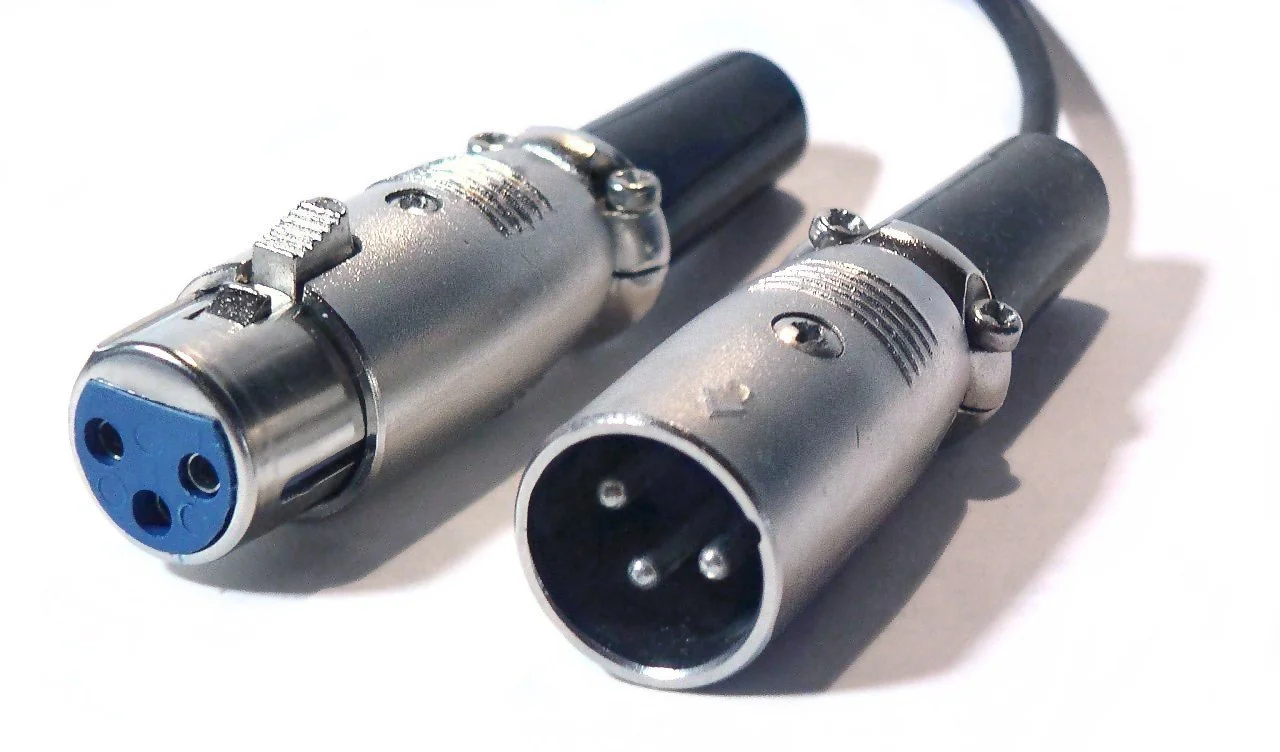
You’re choosing from two categories based on the wires that connect them to recording equipment: XLR microphones and USB microphones. USB microphones use a USB wire, you’ve seen those before when plugging in your phone or keyboard. These are aimed at beginning consumers so you don’t have to buy more equipment, since it plugs right into your computer. They can be more portable and easier to set up, and often have just as good audio quality. However, they are cheaper, so they tend to break down faster or have more connectivity issues. XLR is a different type of cable connector, and we have a photo of them below! XLR mics are aimed at professionals, since they require an audio interface to work. The type of mic that will work best for you depends on your comfortability with audio technology, your portability needs, and cost. But remember, there’s no wrong answer! You can still be a pro-podcaster with a USB mic!
BEST USB MICROPHONES
-
Top Pick: Shure MV7 Dynamic Microphone
-
This is the USB version of a broadcast microphone standard, and it does nearly the same thing. It has a solid build, sounds great, and, in my experience, seems to have less connectivity issues than other USB mics.
-
-
Alt Pick: The Rode Dynamic Series
-
Honorable Mention: Rode NT-USB Condenser Microphone
-
Why didn’t we include the extremely common Blue Yeti microphone? They’re just not that great! As compared to the other choices, they break down faster and have connectivity issues very often. For a similarly priced mic, go for the Rode NT-USB. It’s bullet-proof, sounds incredible, and comes with its own pop filter.
-
SOUND TIP: What’s the difference between a dynamic and condenser microphone? They’re built differently, but what’s important is that condenser mics are significantly more sensitive. That means that they tend to pick up more background noise from your environment. For this reason we tend to rec dynamic mics, but if you have a good sounding room that’s free from noise, condenser mics are a great choice!
BEST XLR MICROPHONES
-
Top Pick: Shure SM7b
-
A classic microphone that sounds great, and you could drop it from your roof and it would be fine.
-
You may need a mic booster or in-line mic preamplifier to get enough volume from the SM7b. I recommend the Klark Teknik CM-1. Make sure you get two XLR cables to connect this and pick up an interface that has phantom power (48V) to power the booster.
-
-
-
Alt Pick: Electrovoice RE20
-
The quintessential radio microphone. It has the big, boomy, radio voice thing that you know, but isn’t as clear as the Shure.
-
-
Honorable Mention: Any Other Good Condenser Microphone
-
The category of XLR condenser microphones is vast, and there are a ton of great options. But they tend to be extremely expensive and you have to be very delicate with them. In no particular order, here are some popular XLR condenser mics:
-
Audio-Technica AT2020
-
Rode NT1-A/NT1
-
Neumann TLM 103
-
Neumann U 87
-
Warm Audio WA87
-
Sennheiser MKH 416
-
-
AUDIO INTERFACE
If you decide on an XLR microphone, you’ll need an audio interface. The interface is the thing that connects your microphone to your computer, transforming the electrical signals in your mic into digital signals for your computer to understand.
-
Top Pick: Focusrite Scarlett 2i2
-
There’s only one pick for podcasting beginners, and it’s the 2i2. It sounds great, it’s built like a tank, and has microphone inputs for two mics so you can record you and a guest at the same time. The interface connects to your computer via a USB wire, so it will work with most computers just fine.
-
-
Alt Pick: MOTU M2 2x2
-
A fantastic sounding interface that has dead simple controls. It comes in second since it is slightly more expensive and USB-C based, which as of this writing isn’t standard on every computer.
-
-
Honorable Mention: Everyone Else Is Pretty Ok!
-
The audio interface category is wide, with lots and lots of good picks depending on your needs. Some questions to consider:
-
How many speakers/microphones will you need to record simultaneously?
-
What type of connection ports does your computer have (USB, USB-C, Firewire, etc)?
-
Are you doing anything else with the interface, like making music? Do you need to connect speakers, or a MIDI keyboard?
-
Do you want to plug it into the wall, or do you want it to be powered via USB (and thus be more portable)?
-
Do you need phantom power?
-
-
Here are some good interface brands, in no particular order: Audient, Apogee, Universal Audio, Solid State Logic, RME, and Neve. There’s also Behringer, but I have some reservations about their sound quality, comparatively.
-
SOUND TIP: You’ll need an XLR cable or two to connect your microphone! Any ol’ cable will do, like the Amazon Basics XLR, Cable Matters, or Monoprice. Don’t worry about getting an expensive one; they’re just not worth it.
POP FILTER
A pop filter is that cloth or metal screen that sits between the microphone and your mouth. It might seem like a radio luxury, but it keeps any word with letters like B and P from being incredibly unpleasant from your listeners. Don’t skip them.
-
Top Pick: Stedman Proscreen 101
-
It’s metal, it holds itself up well, lasts a long time, and is easy to clean. There’s no better choice, but it’s expensive for a pop filter.
-
-
Alt Pick: A Windscreen
-
I prefer a windscreen on my mic so I can get as close as possible to it when recording, and they don’t obstruct my view. They can be washed gently, but they do collect dust and spit so they’re best thought of as disposable. Every microphone will have a foam windscreen that’s made to fit it, so just search your microphone model + windscreen and buy the cheapest one. For example, for the Shure SM7b the correct windscreen model is the A7WS.
-
-
The Rest
-
Any pop filter you find on Amazon or Sweetwater is fine; just get the cheapest fabric one you can find.
-
MICROPHONE STAND
There are few types of mic stands that can work: stands that sit on a table, a tripod setup, and a boom arm that latches onto the side of a table. I prefer the boom arm, since it leaves the most room in front of you and doesn’t tangle up your legs.
-
Top Pick: Rode PSA1+
-
It’s built solidly, makes no noise when you adjust it, and can hold any mic at any angle. You can also install it directly into your desk if you’re handy with a drill.
-
-
Alt Pick: InnoGear Microphone Arm
-
It’s cheap and works! It may wear out faster than other, better quality options. But it gets the job done.
-
-
The Rest
-
There are a ton of quality choices here, so check out the reviews from Rode, Elgato, Blue, On-Stage, and Gator Frameworks.
-
HEADPHONES
You might think one of those huge over-ear headphones are mandatory, but not the case! Use whatever you like! The important thing is that you’re wearing headphones in the first place, so your mic doesn’t pick up audio that’s coming through speakers. If everyone’s in the same room recording, you can get away with not wearing them, but I always recommend at least one person should be listening to hear if something has gone wrong with the recording. Wired headphones are generally preferable to wireless, but only to avoid Bluetooth connectivity troubles.
-
My Picks
-
Any Apple headphones! Seriously, they’re fine!
-
Sony MDR-7506
-
Sennheiser HD650
-
Beyerdynamic DT-770/990
-
SOUND TREATING A ROOM
This is the most important part of the good-sounding-recording puzzle, but also the trickiest. You’re almost definitely not recording in a studio, so we’re going to make the rooms we have sound as good as possible (AKA acoustic treatment). Start by finding a quiet room in your place, like a closet or an office, and set up there. Then, let’s work on the acoustic treatment.
-
Top Pick: Acoustic Panels
-
Acoustic panels are wooden frames filled with fiberglass insulation wrapped in fabric. They’re very similar to what you might find in your attic and walls, and they work the same way! Just as heat gets trapped in your insulation and helps keep your house warm in the winter, sound also gets “trapped” in the insulation and stops it from bouncing around the room. This makes your voice sound cleaner and clearer on the microphone.
-
The best companies that make acoustic panels are GIK Acoustics and Acoustimac. You can buy premade panels, or pick up their cheaper DIY versions. You’ll probably need 3-6 panels, but ask the experts who work there what would be best for your room.
-
Mount the panels on any wall that you’ll be facing when you speak, as well as directly behind and to the sides of you, and you’re good to go.
-
-
Alt Pick: Clothes and Furniture
-
The best free option is to surround yourself with clothing in a closet or arrange your furniture at odd angles in your room. Without getting too technical, more soft things = more things that can absorb sound. You also want to avoid parallel surfaces and hard surfaces, like two walls facing each other, which will just bounce sounds back and forth. And don’t record under a blanket; it will sound like you’re under a blanket and you’ll get heat stroke.
-
-
The Rest
-
You might be familiar with Auralex foam, or that weird, black, pointy stuff you see a lot of video podcasters have. Something is better than nothing, but honestly, it’s only a little better than nothing. Foam helps a little if you place it in the same places you would panels, but I’d suggest you save your money and buy panels when you can.
-
COMPUTER
Most computers will work just fine for podcast recording! The one you already have will almost certainly work, so don’t stress about this one. Even most modern laptops have the power you’ll need.
-
Alt Pick: A Portable Digital Recorder
-
You can plug an XLR mic directly into digital recorders, as well as your headphones. The Zoom H4n is a classic recorder that’s a wonderful tool, especially if you’re recording on the go. Check out the entire Zoom line and see which version works best for you. Just make sure to double check that the recorder has enough inputs for the number of mics you’re using.
-
RECORDING SOFTWARE (DAW)
A digital audio workstation (DAW) is the software that records audio on the computer. Each one has its own quirks, costs, advantages and disadvantages. There is no Ultimate Best pick here; always use the one that makes the most sense for you!
-
Top Pick: Pro Tools
-
This is the industry standard DAW for music and post-production, but that still doesn’t mean it’s perfect. It’s expensive and has a steep learning curve, but is also very flexible. Worthwhile to learn, but difficult for beginners.
-
-
Alt Pick: Reaper
-
Very cheap ($60 for a discounted license) and fully featured, this DAW is incredible. It also has a learning curve, but the flexibility and list of features make learning this DAW worth the time.
-
-
Honorable Mention: GarageBand
-
The best free DAW, hands-down. It’s incredibly easy to learn and does the job. Only two limitations: 1) it can’t record in SUPER high resolution, but it shouldn’t be a problem for podcasters, and 2) It’s Mac only.
-
-
The Rest: I didn’t include a lot of DAWs that people swear by in this list. The ones above are the DAWs I have experience with. Some other programs include:
-
Audacity: a good free choice for Windows users, but it might crash on you. Also, it is a destructive editor, meaning that anything you do to the file is actually changing the file itself forever. It’s also ugly to look at, which is important 10 hours into an editing session.
-
Audition: a great DAW, but also expensive like Pro Tools, and less stable.
-
Hindenburg: probably great, but I’ve never used it so I can’t recommend it. Try it!
-
Ableton: a great DAW, but you’re forcing it to work for podcasting since it’s best for music
-
Logic: the big brother of GarageBand. A great DAW if you already know GarageBand super well, as the tools are the same. Lacks some editing features that irk me, since it’s geared towards musicians as well.
-
Cakewalk, LUNA, Cubase, FL Studio… Man, there are so many.
-
OTHER SOFTWARE
If you’re working with remote guests that don’t have the ability to record themselves, you’ll need something to record your video call (and it never hurts to have a backup even if they do know how to record themselves!).
-
Top Pick: Rogue Amoeba Piezo
-
I don’t want to mince words – forget every other recording service, app, and software. There is nothing cheaper or easier than Piezo. It’s one click remote recording at decent enough quality, so set it and forget it! It’s stable, looks great, and costs like twenty-five bucks. Unfortunately, it’s Mac only.
-
-
Alt Pick: Rogue Amoeba Audio Hijack
-
Piezo’s big brother. Costs more, but you get higher quality recording and many, many more options. It’s also nearly as easy to figure out as Piezo! A great option if you have the budget. Also Mac Only.
-
-
Windows Users: (I’m not one, uh…)
-
I haven’t tested anything for Windows, but Sound Recorder could work!
-
-
The Rest
-
Zencaster, Riverside, Squadcast, etc: these are all-in-one tech panaceas. They’re trying to do too much, so they don’t do anything well. As you navigate the podcasting landscape and gain experience, you won’t need these programs. Video conference software, Piezo, and DAWs are you’ll need.
-
TOTAL COST - Budget Version: $213 + tax & shipping
-
Rode NT-USB (comes w/ pop filter): $169
-
InnoGear Mic Stand: $19
-
Whatever headphones you already have: $0
-
Closet: $0
-
GarageBand (or Audacity on PC): $0
-
Piezo: $25
TOTAL COST - Pro Version: $1,409 + tax & shipping
-
Shure SM7b: $399
-
Klark Teknik CM-1: $45
-
Rode PSA1+ Boom Arm: $129
-
Sony MDR-7506: $100
-
Acoustic Panels (6): $438
-
Pro Tools: $10/month
-
Audio Hijack: $64
Now that you’ve got your equipment, you’re ready to dive into the wild world of podcasting. If you need any help along the way, check out all of our free resources at multitude.productions/resources!
-Brandon Grugle (Head of Production) and Eric Silver (Head of Creative)
Discord as a Community: Tips & Resources
Multitude is wholeheartedly a community-first collective. I noticed this right away when I came aboard as the Community Manager. So, when I was asked to develop a Discord server for our growing flock of listeners, I knew authenticity, inclusion, and fun would be at the top of my priorities list.
Multitude is wholeheartedly a community-first collective. I noticed this right away when I came aboard as the Community Manager. So, when I was asked to develop a Discord server for our growing flock of listeners, I knew authenticity, inclusion, and fun would be at the top of my priorities list.
For those new to Discord, it’s a handy, free-to-use program that harkens back to the days of early internet chat rooms. But, instead of a single room, it’s an entire chat HOUSE (called a ‘server’) with multiple rooms (called ‘channels’) for multiple conversations. You can make a Discord server for any reason, but we’ve got tips specifically for our fellow creators looking to build a unique space for your audience to hang out.
The goal of any Discord server is to maintain a delicate vibe: Structured but Casual. To achieve this, we have a detailed code of conduct, active moderation, and highly specified channel topics to accommodate a large and diverse user base. This robust regulation keeps things safe and easy to maintain. However, we also want folks to feel comfortable and free to be themselves. Over the last few months, here’s how we’ve been working to strike that balance.
DON’T SKIMP ON MODERATORS
Moderators make everything you want to do on Discord possible. This is especially true when you’re actively trying to grow your server as a community. There is no room for expansion without moderation, which is why the FIRST THING you need to do is invest in a solid team. Not after the server has gained some traction, and not after your existing team is already burning out. Moderators will ultimately man the frontlines of your server, so prioritize them as such.
The Multitude Moderation team is currently five mods strong (shoutout to Tanya, Brae, Sam, Sean, and Zach!). Why five? Because Multitude already has a large fanbase, and a free-to-join server tends to attract more users in general. More importantly, we wanted to bring in a diverse set of perspectives to build a more accessible space. Plus, our mods are longtime Multitude listeners with honest investment in the community they guide. When they’re there, they’re excited to be, and that inevitably trickles down to the users they serve.
FUN DISCORD FACT #1: Burnout among moderators, especially uncompensated ones, is REAL. Be sure you’re investing in the wellbeing of your mods with routine check-ins, honest feedback, and fair reimbursement (whether monetary or otherwise).
GET YOUR USERS INVOLVED
Once folks joined our server, we prioritized making it a great place to be. I mean, imagine a party with no music, conversation, or games. The room would clear out in a matter of minutes. So, in order to entertain folks, incentivize engagement, AND encourage them to invite their pals, having fun needs to be easy. Here’s what we’ve implemented so far to do that:
EXPAND THOSE CHANNELS
In the Multitude server, we have everything divided up into clear, specific sections. The nuts and bolts – important info, our Code of Conduct, and announcements – are right at the top. Then we get into the fun stuff: general chat topics, specific channels for Multitude Shows, channels for events hosted on Discord, and the MultiCrew, a locked category for our paid members. These categories house a PLETHORA of channels tailored to the needs and interests of our users. Take our general chat setup as an example:
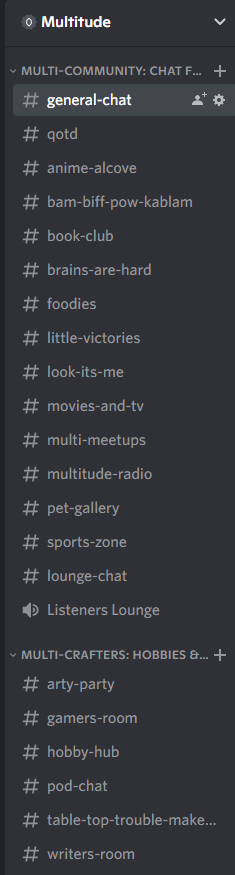
That’s twenty-one text channels plus an open voice/video chat channel for folks to use. But it’s not excessive when users can find the specific thing they want to connect with in real time, minus the hassle of scrolling through miles of text. We actually get routine requests for additional channels as new things gain traction, so there’s no fear of doing “too much” or over-organizing on our end.
For your own server, focus less on a number and more on building channel spaces that amplify your community’s uniqueness. For instance, if people are looking for a place to discuss content creation, start up a creator’s chat channel. Or, raise the community’s serotonin levels with a pet pic parade channe!. I highly recommend a channel specifically for users to share their personal victories, big and small. It’s beyond wholesome and allows the entire community to celebrate together.
GET THEM TALKING
We’re a big fan of the Question of the Day bot. This is a straightforward Discord bot that’s simple to implement and customize to your server. We have it set to ask a random, open-ended question every day around 10 AM EST in the QOTD channel. Sometimes it’s silly fun, sometimes it’s an incredibly vulnerable and heartfelt experience shared by the community. Either way, it’s an awesome tool that sparks daily activity.
We also solicit submissions from our users that go into other Multitude communications. Fan art, listener photos, folks wearing their merch out in the real world, and show testimonials all go into our monthly newsletters, so we transparently solicit that material in Discord. So far, passing the mic to our users has made way for frequent, vibrant conversations that spread out into other parts of the server. Folks get excited to share what they love, and we get to amplify it with gratitude and action.
HELP THEM CONNECT
I cannot fully express the joy of meeting an internet friend IRL, especially when that friend loves all the same things (and podcasts) you do. Our users are the type to seek out that connection through meetups, so we have a channel set up to help them do it safely. We don’t organize the meetups ourselves, but we keep eyes on logistics and moderate for information privacy.
For those less eager to meet up in person, we recently started a MultiCrew-exclusive Pen Pal Exchange. It’s an at-will program our members can enroll in to be paired with a buddy based on interests, location, and taste in Multitude shows. In less than two months, we’ve paired sixty people up to explore the art of letter writing, both traditionally and through electronic means. The best part: we confidently launched this program after receiving overwhelmingly positive feedback about the idea in the Discord Server! Users told us what they wanted, we made it, and they’re happy!
INVEST IN EVENTS: BIG & SMALL
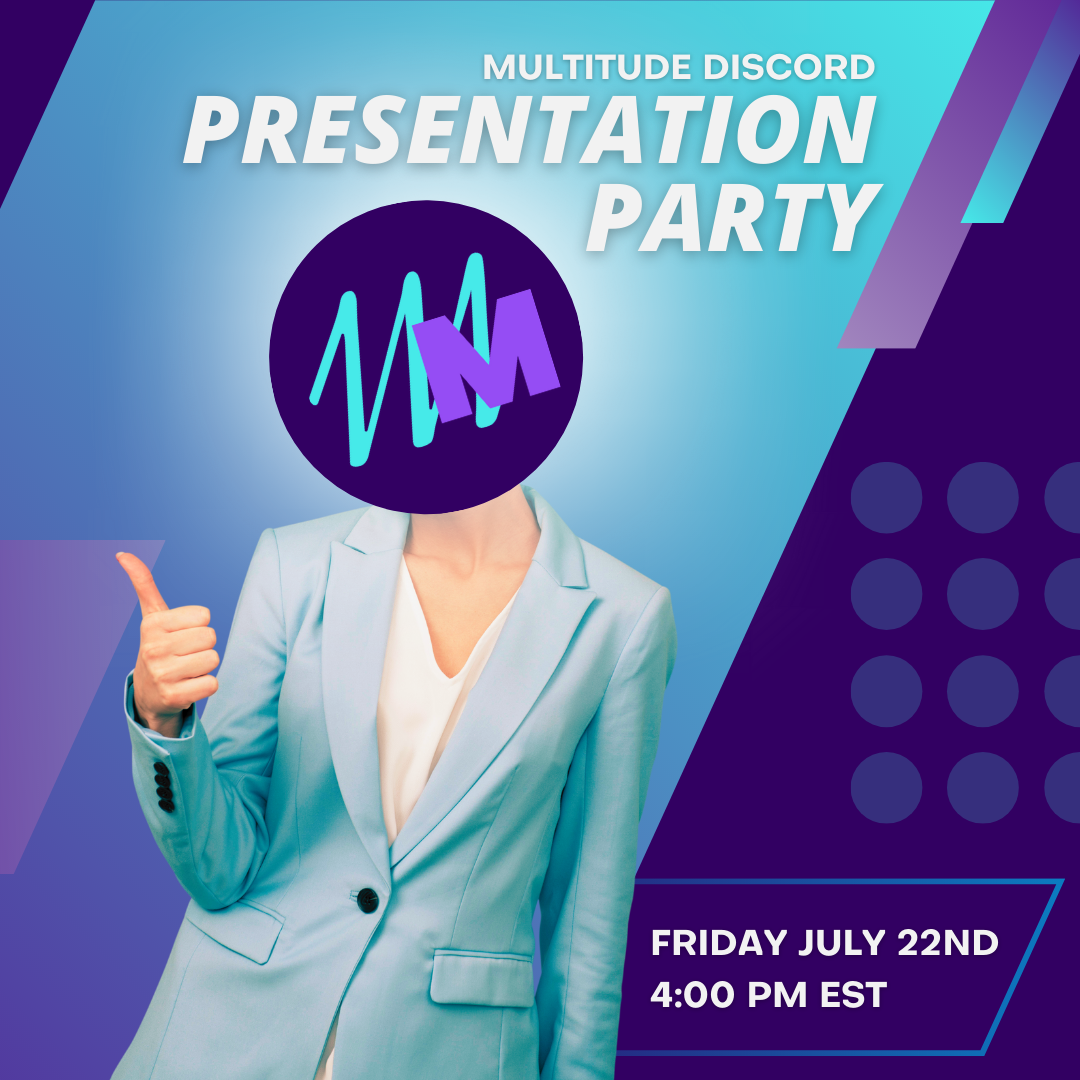

After pivoting hard to virtual-only events in 2020, it’s a reasonable assumption that folks are tired of looking at other people on screens. However, Discord events are the single most fun and engaging thing we’ve done in our server thus far. To plan them, we follow a couple of basic guidelines:
-
What is (reasonably) easy to put together?
-
What can be achieved in under two hours of event time?
-
What is engaging for an all-ages audience?
-
What’s fun or stressless for the talent involved?
For us, the answers are Jackbox streams, pub-style trivia, and a presentation party!. Not only has it been a total blast for us, but it’s given participants quality facetime (ear-time?) with our hosts outside of their individual shows. They also get to play along with us while building a relationship with our collective. It’s a win-win that often comes with belly laughs.
We also use Discord as a way to connect with our paid MultiCrew members on a bi-monthly basis. In true structured-but-casual style, we gather in a private voice channel, answer questions, share stories, and show our appreciation for their extra support. Sometimes this looks like a candid, unguided conversation. Sometimes it’s all of us holding our cats, dogs, and the occasional toddler up to the camera for all to enjoy. The important part is that our members enjoy hanging out with us, and that we’re able to facilitate these opportunities for them to do so.
FUN DISCORD FACT#2: We’re limited by Discord’s inability to host more than 25 voice-connected users if ANY video is involved, but we’re crossing our fingers for an update that’ll allow us to exceed that. In the meantime, voice chat is currently limitless when all user cameras are off. People don’t like being perceived all the time, so it’s occasionally a perk!
FUN DISCORD FACT #3: Once again, Moderators come in clutch to make this possible. By managing busy chats, flagging problematic behavior (if any), and feeding questions and comments to our hosts, our team is able to focus solely on being present and having fun.
BE ACTUALLY RECEPTIVE TO FEEDBACK
Look, we don’t have it all figured out. Nobody does. People contain Multitudes (GET IT?!) and tech never stops evolving. So, we’re always actively soliciting feedback from our users. Requests are usually small and pertain to something like server aesthetics, pronouns and identity markers, rule clarification, or self-promotion permissions. Simple stuff, yes, but it all goes a long way. And if they’re willing to ask for it, it must be meaningful.
It’s easy to say you’re open to feedback, but you have to be in the right headspace to receive it (and put it into action). I recommend thoroughly examining how available you are for it. Are you physically available to read messages outside of your regular hours? Do you have clear boundaries on that availability? How about on the mental health side? Are you able to hear what your users have to say without taking it personally? Without making judgements? It’s not easy! Believe me, being available is 75% of my job as a Community Manager, and that comes with real consequences when left unchecked.
At the end of the day, feedback is the best gift a thriving community can give you. I beseech you: take it! It’s almost always free!
I’ve outlined a lot here, but it all boils down to one thing: Discord exists for communities, so everything you do there should serve and foster yours.
Discord is an invaluable tool that connects people across the board. It’s a hub for friendships, movements, and joy. But it’s not inherently self-sustaining. The investments you make at the start of your server’s life will quickly decide on its success. So, get hands-on. Keep your eyes and ears open. Have a lot of fun. And remember, you can’t build a community without being part of it, otherwise you’ll never understand what it needs.
Community Manager, Multitude
Resource: Make Your Patreon Work for You
When folks get started on a new podcast, we get a lot of questions about, “when should we start looking towards networks?” The underlying idea under this question is usually, "How can someone sell ads for us to make money on the show?” But building a Patreon community will be a much easier, faster, and more rewarding way to get a financial return on a burgeoning show.

When folks get started on a new podcast, we get a lot of questions about, “when should we start looking towards networks?” The underlying idea under this question is usually, "How can someone sell ads for us to make money on the show?” But building a Patreon community will be a much easier, faster, and more rewarding way to get a financial return on a burgeoning show.
We’ve found there are really two reasons someone will support you on Patreon: 1) you’re offering more regular content and they will pay for it or 2) they want to give you money for nothing in return. Depending on the amount of time and work you want to put in, your Patreon strategy should revolve around one of the previous two ideas.
SOME QUICK TIPS TO START
Don’t have a $1 dollar tier (unless it's for no rewards). Is your time worth 25 cents a week? No, it’s not. Folks can pay whatever they want on Patreon, so if they want to throw you a dollar a month, they can. Don’t give them the option from the jump though.
If you’re beginning a show, have a Patreon from the beginning. Let people get on the ground floor!
Don’t overload yourself. We STRONGLY dissuade you from doing behind-the-scenes videos, playlists, exclusive merch, research notes, a Discord, and more. In fact, a lot of these offerings aren’t what move the needle. If you’re going to offer merch or physical products, it should be at a high tier that gives you a lot of money in return, because shipping is a nightmare.
GIVE THEM REGULAR CONTENT
If you have a good chunk of time to devote to a Patreon, want to push for this to be your full-time job, or are looking to build community through your Patreon, the best way to do this is with exclusive content. People like your show, enough that they’re downloading it as soon as it comes out and marathoning the entire back catalog. So give the people what they want: more podcast and more of you!
If you have a fictional or more structured show, this Patreon-only podcast should be looser, both in terms of style and how you can all act on the mic. It’s the “just talking” show you might have avoided doing as your main show, but with an audience paying for more audio time, y’all can be yourselves and reveal more facets of your personality.
This was our main idea around Party Planning, the exclusive podcast for Join the Party. What started out as a structured TTRPG advice show has blossomed into sharing what’s going on in our lives, spontaneous creation on mic and video, and weird game shows, allowing us to be ourselves more.
Hey Riddle Riddle, a riddle-and-improv show on Headgum, is leaning into this by doing incredibly interesting audio on their Patreon feed. While they must do riddles on the podcast, the Patreon feed is an opportunity for them to be creative, giving an already devoted audience more of what they like about HRR. This leads to incredibly fun places, like TTRPGs powered by riddles, full 50-minute improv scenes, unhinged gameshows, and a whole lot more.
MAKE YOUR TIERS WORK FOR YOU
In our experience, the optimal number of tiers is four: a low-tier for everyone to contribute and join a Patreon, a chunky middle tier with the most number of rewards, a higher Producer Level tier where people hear their names read out loud, and an incredibly-high deluxe tier where a very select few get something very special.
When you’re making your regular content, put it at that second, chunky tier. This is a consumer trick that has to do with the human condition: folks want to pick the middle option. Whether soft drinks, cakes, ticket prices, whatever, unless they really want the lowest or the highest, people will want to pick the middle choice. Because of that, make your lowest tier an option for people who want to just support, but don’t make the most reward-dense. Save that for the middle tier!
Check out this great example from our rude friends over at Rude Tales of Magic:
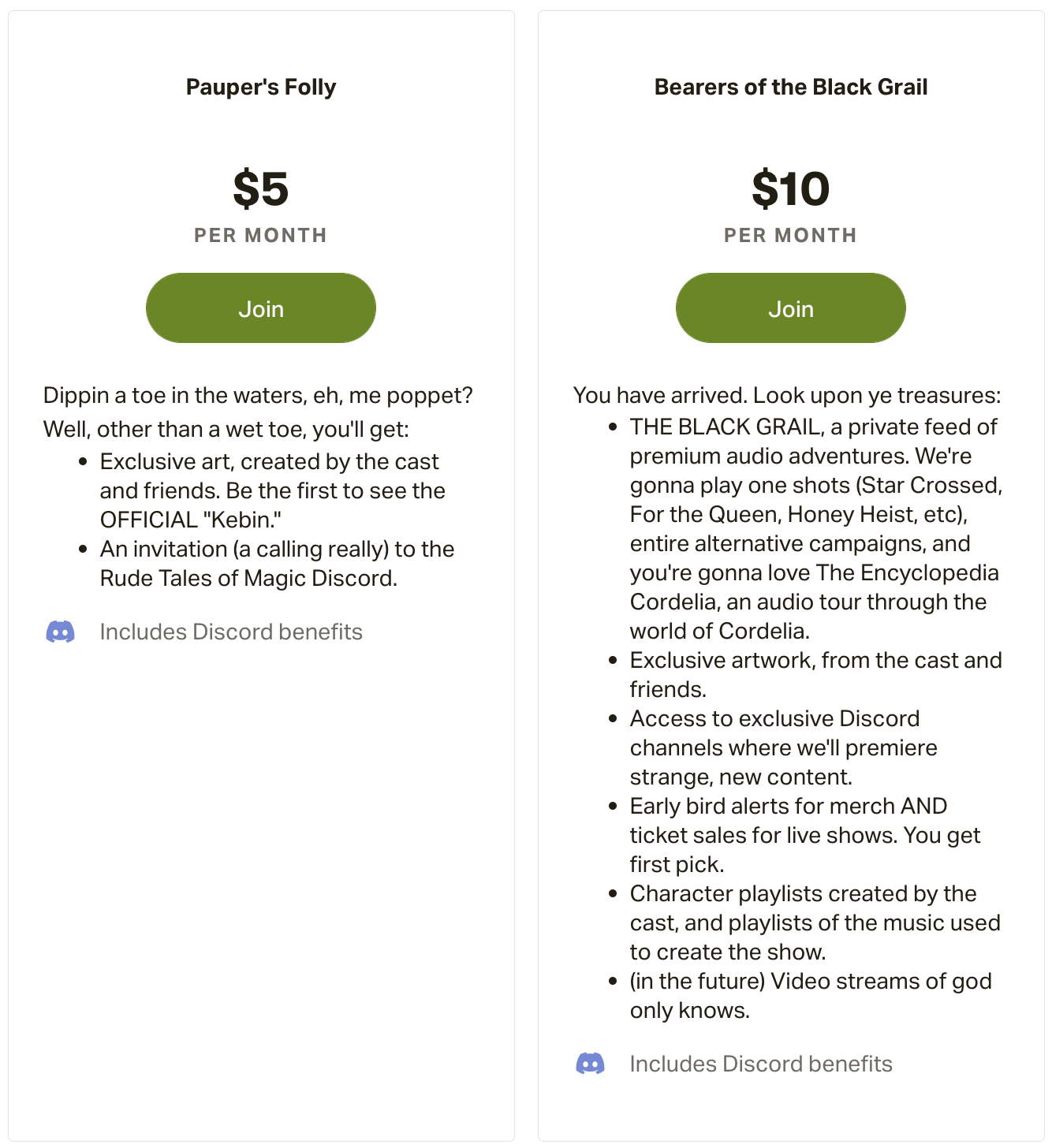
They even called the lowest tier the Pauper’s Folly! You always know what you’re getting into. We’re doing this over at Join the Party as well. Our $10 tier has the newest rewards, plus Party Planning is planned as a video medium, with good cameras, visual jokes, and the only real opportunity for folks to see our faces as we make jokes.
As for the incredibly deluxe highest tier, even if you think it is silly, you should still do it. For one, it ties into the human condition thing: the middle two tiers look much more appealing. But for another, let a rich person spend their money on you! It’s not your responsibility to say, “No, no, this is silly, don’t do this.” It’s your job to say, “Oh wow, thank you, you’re incredible!” if it happens!
Make it 69 dollars a month! Offer to send them a video on their birthday. Make a poster that you need to look at every time you record that has their name on it. Make it big, make it silly, but at least, make it.
ALLOW PEOPLE TO GIVE YOU MONEY
You may be thinking that the clause we wrote earlier, “Depending on the amount of time and work you want to put in…” was a value judgment on you and we’re pushing you towards making extra regular content. No, absolutely not. If you can’t or don’t want to put more work into bonus content, you don’t have to! But you should still allow your listeners to support you directly. Especially after March 2020, people want to show appreciation to creators with their dollars, and you should give them the ability to do so. Also, you deserve voluntary money in compensation for the free audio you’re putting into the world.
If this is the position you find yourself in, optimize your Patreon for this! You could make just one tier at $5 or $10 a month, title it WOW THANK YOU, and offer to read patron names in the credits every single episode. Or, you could do three tiers: a $2 dollar THANK YOU with no reward, $5 or $10 tier of YOU SHOULDN’T HAVE and read their name every episode, and a $20 tier PRODUCER LEVEL where they can suggest one episode subject a year you’ll cover on the show.
This is minimal work on your part, and you give folks the thing they love the most: hearing their name on their favorite show!
AN IMPORTANT CAVEAT ABOUT THE TECH LANDSCAPE
Right now, we’re recommending Patreon as the platform to allow people to support artists (ie: you) directly. Patreon is currently the only mainstream game in town explicitly doing membership support. We beg anyone else in the tech space to put pressure on Patreon and build a competing platform to do the thing the free market was supposed to do: make a better product for the customer. As the sole entity in this space, this has given Patreon the space to do things that tech companies love to do: “grow” at the expense of their initial product for the benefit of shareholders and flirt with crypto and NFTs. If Patreon does go full bore into crypto and NFTs, we can’t, in good conscience, support it any longer, and we will update this article accordingly. If you are using Patreon, please take the time to tell them not to do crypto; they’ll listen if enough folks complain.
So get out there and make money on your art! How are you going to be able to podcast if you can’t eat?
Head of Creative